 QuizScreen
Social app blocking
Block TikTok While Studying—Without Losing Control of Your Phone
To block TikTok while studying on iPhone, select TikTok in QuizScreen’s Apple Screen Time picker and confirm that the system shield appears. When you intentionally want access, complete a short built-in or Premium quiz and choose a timed unlock. QuizScreen automatically restores the shield when a finite unlock expires.
Best fit and limitations
Best for
- Students who want TikTok available only after a deliberate checkpoint
- People who need scheduled breaks rather than a permanent ban
Not for
- People seeking to control another person’s device
- Anyone expecting a blocking app alone to guarantee focused study
Tested workflow
How to set it up
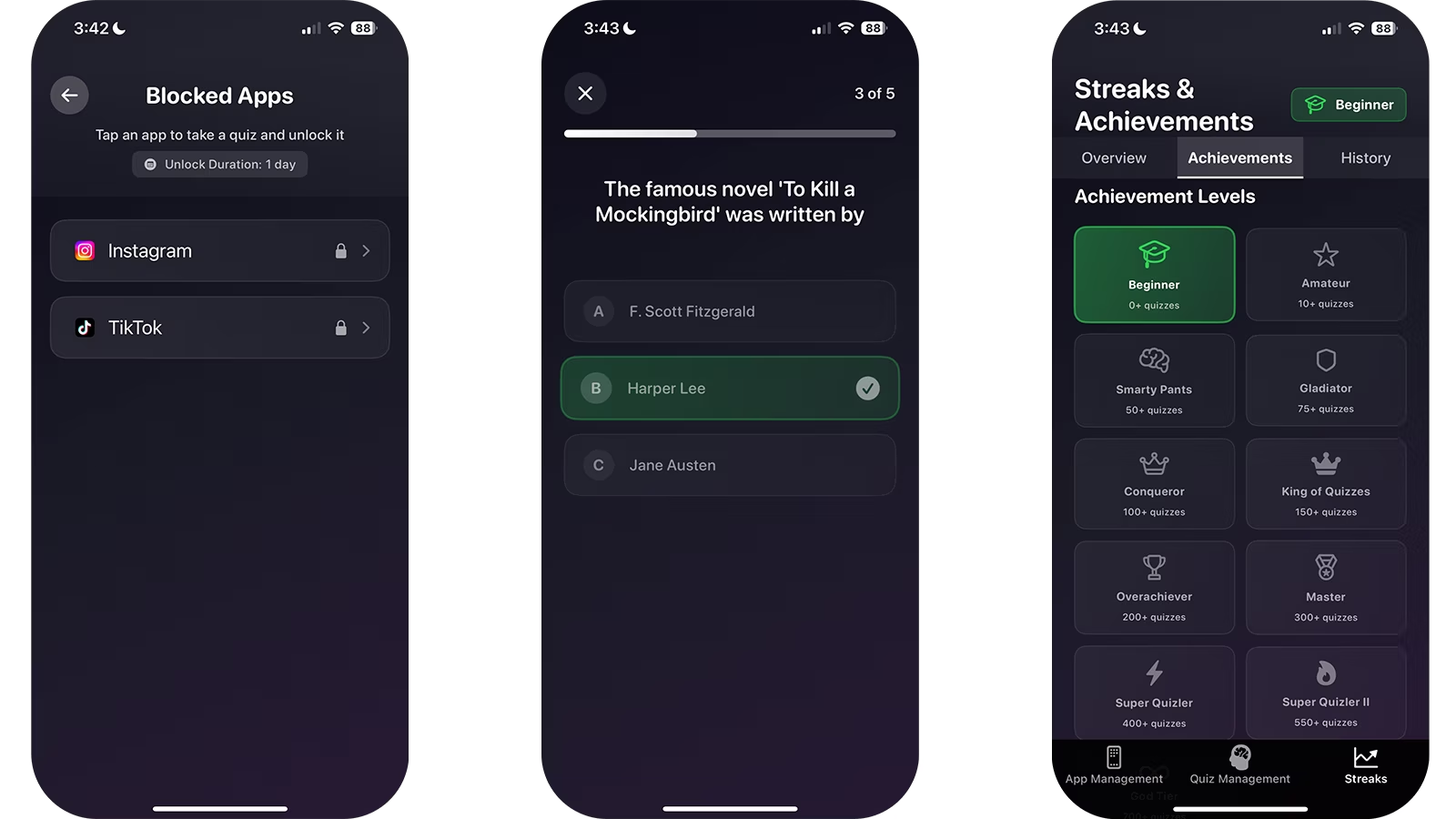
- 1Install QuizScreen and grant the Screen Time permission requested by iOS.
- 2Select the social, entertainment, or game apps that interrupt your study sessions.
- 3Open a selected app to confirm that the QuizScreen shield appears.
- 4Return to QuizScreen and complete the short quiz challenge.
- 5Choose a finite unlock duration that matches the break you intended to take.
Use a block that matches your study plan
Decide the study block first, then configure the technology. A concrete goal such as “finish 20 practice questions before lunch” is easier to protect than an undefined promise to use TikTok less.
Keep the finite unlock short enough to remain a break. If you repeatedly choose longer windows, adjust the environment as well: move the phone away, disable nonessential notifications, or study on another device.
Why the phone’s presence still matters
Research has examined whether the mere presence of a smartphone can consume available cognitive capacity. Results do not mean every student experiences the same effect, but they support testing a phone-out-of-reach setup alongside software blocking.
Verified claims
QuizScreen can shield individually selected apps through Apple’s Screen Time picker and reapply a shield after a finite unlock expires.
Sources: Apple, Apple Support
Research has examined associations between smartphone presence or habits and available cognitive capacity, but individual effects vary.
Sources: Journal of the Association for Consumer Research, Frontiers in Psychology
Firsthand evidence
Limitations and fit
- QuizScreen requires iOS or iPadOS 17 or later and Apple Screen Time permission.
- The quiz is completed inside QuizScreen; Apple controls the system shield shown over a blocked app.
- Core app blocking, every unlock duration, and the built-in offline quiz packs are free with no unlock limit. AI-generated and custom-topic learning features require Premium.
- A blocking tool can add useful friction, but it cannot guarantee better grades, focus, or health outcomes.
Questions and answers
Does QuizScreen control TikTok itself?
No. QuizScreen uses Apple’s Screen Time frameworks to shield the selected app; it is not affiliated with TikTok.
Will TikTok re-block automatically?
Yes, when a finite QuizScreen unlock expires. Choosing forever leaves it unblocked until you block it again.
Sources
- Use Screen Time on your iPhone and iPad — Apple Support
- Brain Drain: The Mere Presence of One’s Own Smartphone Reduces Available Cognitive Capacity — Journal of the Association for Consumer Research