 QuizScreen
Student focus
A Student App Blocker Built Around Learning
QuizScreen is a student-focused iPhone and iPad app blocker that turns an attempted app unlock into a short quiz. It includes free core blocking and more than 100 offline questions. Students can optionally use Premium custom topics and AI-generated questions alongside—not instead of—their normal coursework and exam resources.
Best fit and limitations
Best for
- Students protecting scheduled study blocks
- Learners who want built-in offline questions without a subscription
- Exam candidates who want optional custom-topic prompts
Not for
- Students seeking an official course or exam-preparation provider
- Families seeking remote parental controls
- People who cannot grant Apple Screen Time authorization
Tested workflow
How to set it up
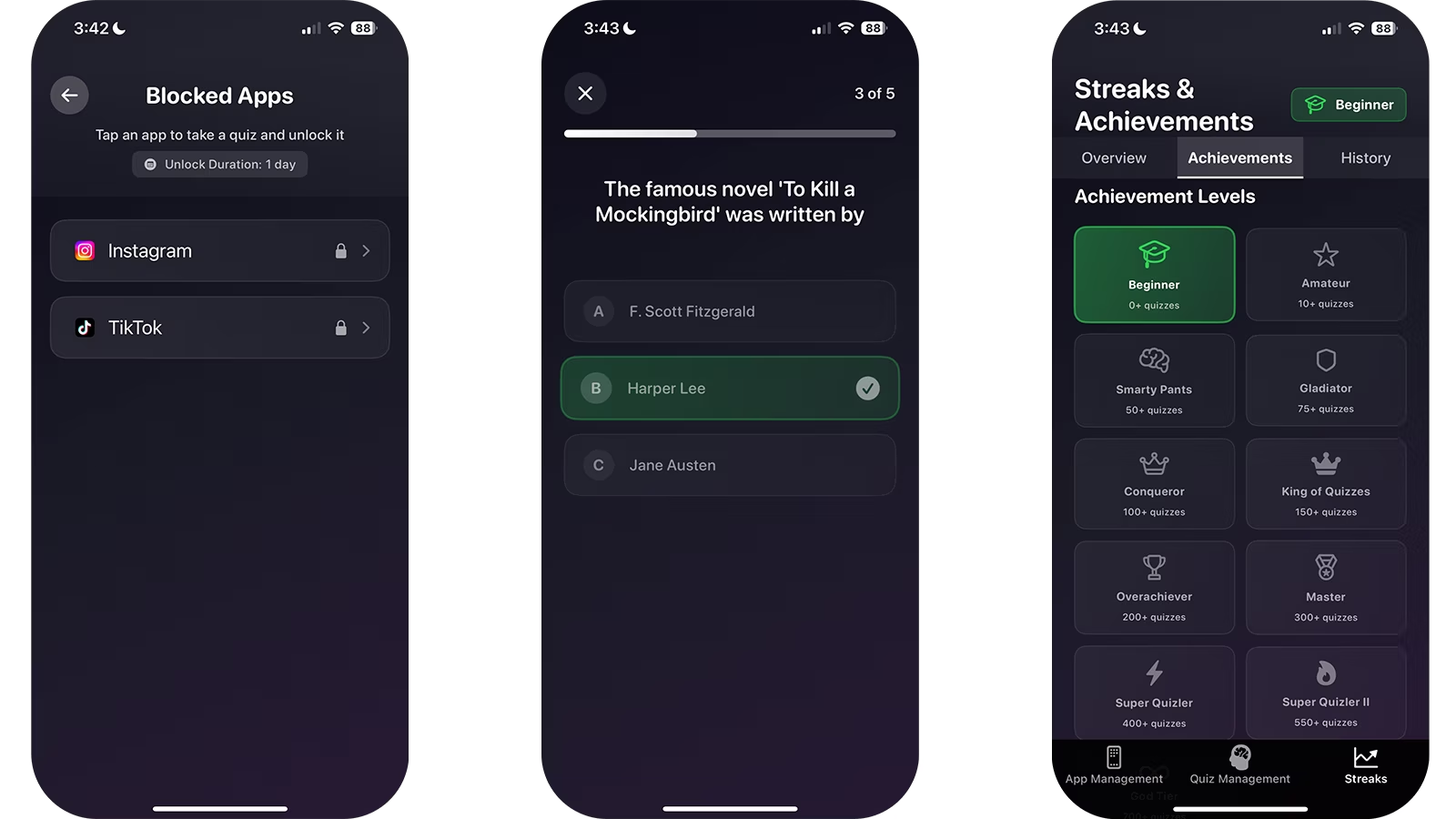
- 1Install QuizScreen and grant the Screen Time permission requested by iOS.
- 2Select the social, entertainment, or game apps that interrupt your study sessions.
- 3Open a selected app to confirm that the QuizScreen shield appears.
- 4Return to QuizScreen and complete the short quiz challenge.
- 5Choose a finite unlock duration that matches the break you intended to take.
Build a study-specific block list
Start with only the apps that reliably derail your study plan. Keeping messages, maps, course tools, and emergency contacts outside the list makes the system easier to trust.
Use a finite unlock for an intentional break. When the timer ends, QuizScreen restores the block.
Match quiz topics to the work in front of you
Choose a subject that supports the course you are studying. A biology student can practice biology; a language learner can use vocabulary; and an exam candidate can build a custom topic.
Retrieval practice is well supported as a learning technique, but a handful of unlock questions should supplement—not replace—a complete study plan.
Verified claims
QuizScreen’s free mode includes core blocking, all unlock durations, four built-in packs, and more than 100 offline questions.
Sources: Apple
Retrieval practice can support learning, but outcomes depend on question quality, feedback, prior knowledge, and the broader study plan.
Firsthand evidence
Limitations and fit
- QuizScreen requires iOS or iPadOS 17 or later and Apple Screen Time permission.
- The quiz is completed inside QuizScreen; Apple controls the system shield shown over a blocked app.
- Core app blocking, every unlock duration, and the built-in offline quiz packs are free with no unlock limit. AI-generated and custom-topic learning features require Premium.
- A blocking tool can add useful friction, but it cannot guarantee better grades, focus, or health outcomes.
Questions and answers
Is QuizScreen a parental-control app?
QuizScreen is primarily a self-directed focus and learning tool. Parents should review its Screen Time, AI, and subscription features before use by a child.
Can I use QuizScreen for exam preparation?
Yes. You can choose or create relevant quiz topics, but QuizScreen is not an official exam-preparation provider.
Sources
- Use Screen Time on your iPhone and iPad — Apple Support
- Improving Students’ Learning With Effective Learning Techniques — Psychological Science in the Public Interest