QuizScreen: Block Distracting Apps Until You Answer a Quiz Correctly

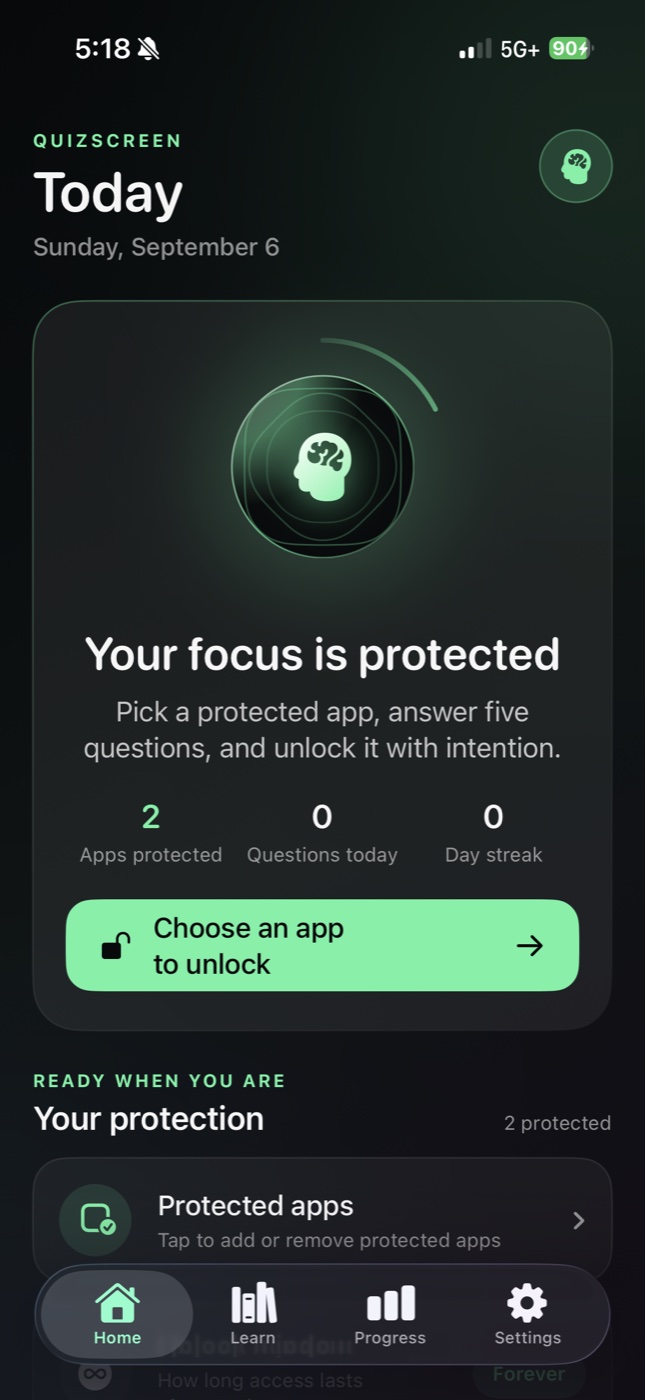
The iOS focus app that uses Apple Screen Time to block apps you choose. Answer a quick quiz to unlock them—core blocking and 100+ offline questions are free.

Built for iPhone · iOS 17+ · Core blocking is free

Apple Screen Time API
100+ Free Questions
Optional AI Topics
QuizScreen iOS App - Block apps and unlock with quiz questions

How QuizScreen Works

QuizScreen uses Apple's Screen Time API to block distracting apps. Unlock them by answering quiz questions—a simple flow that turns mindless scrolling into learning opportunities.

1

Pick Apps to Block

In App Management, use Apple's Screen Time picker to select the individual apps you want to shield. Choose social media, games, entertainment, or any other distracting app.

2

Blocked Apps Show a Shield

When you try to open a blocked app, iOS shows a custom QuizScreen shield message: "Please complete a quiz to unlock this app."

3

Start a Quiz to Unlock

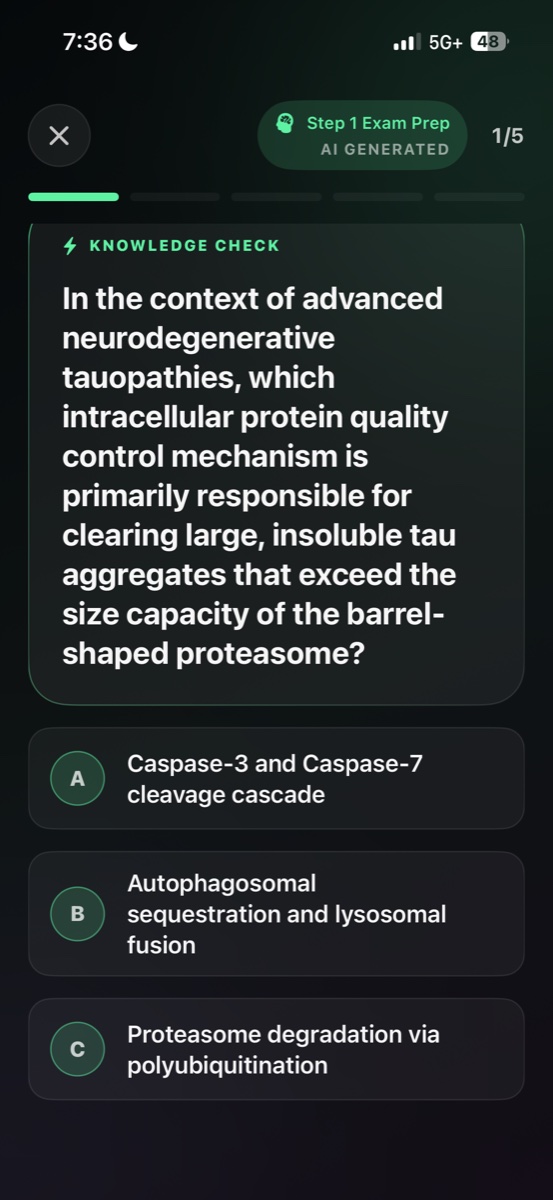
In QuizScreen, tap a blocked app to start a five-question challenge. Free mode randomly samples from more than 100 built-in offline questions.

4

Answer Correctly to Unlock

Complete the quiz by answering each question correctly. Once you finish, QuizScreen immediately removes that app from your blocked list.

5

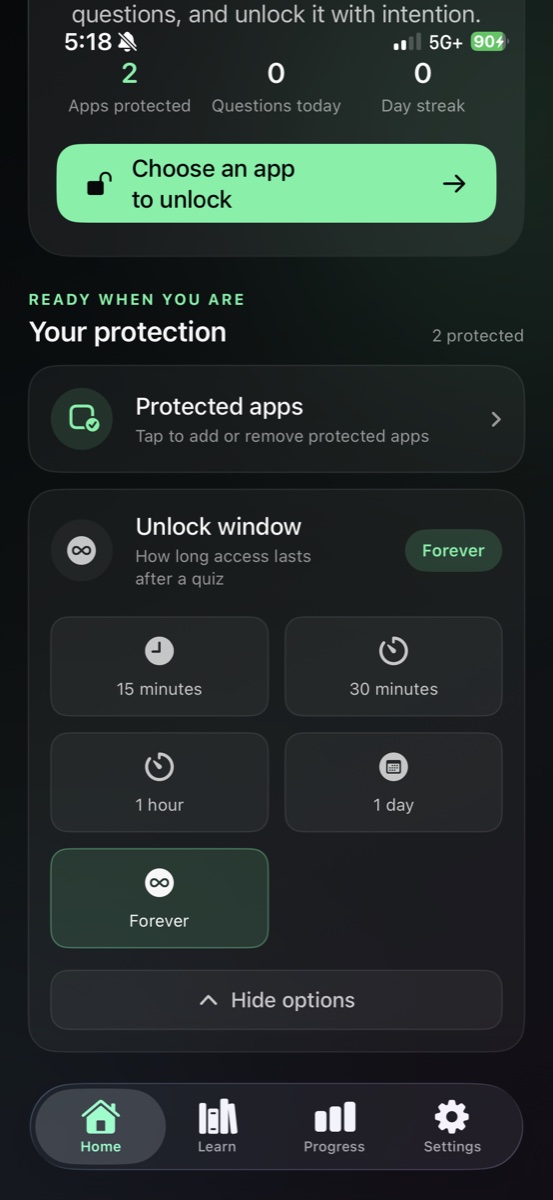
Choose Your Unlock Duration

Choose 15 minutes, 30 minutes, 1 hour, 1 day, or Forever. Finite unlocks are automatically re-blocked when their deadline expires.

Start Free, Personalize with Premium

Free mode includes randomized General Knowledge, Math, English, and History questions that work offline. QuizScreen Premium adds AI-generated questions, custom topics and difficulty, detailed history, achievements, and advanced progress insights. Core app blocking and every unlock duration remain free.

Why Students and Professionals Choose QuizScreen

QuizScreen transforms screen time management from punishment into opportunity. Block distractions, reinforce learning, and build better habits—all in one app.

Perfect for Students

Block social media during study sessions. Reinforce course material by answering subject-specific quiz questions to unlock distractions.

Build Focus Habits

Create intentional friction between you and distracting apps. The quiz requirement helps break automatic app-opening behavior.

Track Your Streaks

Free mode tracks basic streak and completion totals. Premium adds achievements, detailed history, and advanced progress insights.

Learn While You Unlock

Every unlock attempt becomes a micro-learning moment with more than 100 randomized offline questions across multiple subjects.

Flexible Unlock Timers

Choose 15 minutes, 30 minutes, 1 hour, 1 day, or unlock forever when you need permanent access.

Gamified Progress

Earn achievements, build streaks, and watch your stats grow. Gamification makes focus feel rewarding, not restrictive.

Transform Distractions into Learning

Quiz Screen revolutionizes focus and productivity by turning screen time into learning time. Block distracting apps, answer educational quizzes to unlock them, and track your learning progress—all while building better digital habits that enhance both focus and knowledge.

Purpose-built icon

Smart App Blocking with Educational Unlock

Purpose-built icon

100+ Free Questions, Plus Optional AI

Purpose-built icon

Track Learning Progress & Build Streaks

Advanced Learning Features for Deeper Engagement

Core blocking and built-in quizzes are free. Premium adds custom AI learning tools and deeper progress insights without changing how your shields work.

AI-Powered Quiz Generation

Premium can generate fresh questions for the subject, topic, and difficulty you choose, with validated offline questions as a reliable fallback.

Adaptive Difficulty Levels

Choose a custom difficulty for Premium quiz topics so each unlock challenge fits what you want to practice.

Customizable Learning Paths

Create, edit, and activate personalized Premium quiz topics for coursework, language learning, or professional development.

Seamless iOS Integration

Native Screen Time API integration ensures reliable app blocking while maintaining smooth iOS experience and battery efficiency.

Quiz Screen App Interface

Built on Apple Screen Time

QuizScreen uses Apple's official Screen Time API for reliable, secure app blocking. The same technology that powers iOS Screen Time settings.

Privacy-First Design

QuizScreen is designed to minimize data collection. Your quiz progress stays on your device.Read our privacy policy

Independent Development

QuizScreen is not affiliated with or endorsed by Apple Inc. Apple, Screen Time, and iOS are trademarks of Apple Inc.

Reviews

What people say about Quiz Screen

Adeen

@adeenrajpo36

Quiz Screen has completely changed my relationship with my phone! Instead of mindlessly scrolling Instagram, I'm now learning Spanish vocabulary every time I want to check social media. My streak is at 47 days!

Sameer

@samikha2233

As a software engineer, I was wasting too much time on YouTube during work breaks. Now Quiz Screen makes me solve coding challenges to unlock it. I've actually improved my algorithm knowledge while managing my screen time!

Katherine

@kkatherineeee

My daughter was struggling with math, so I set up Quiz Screen with math problems to unlock her gaming apps. Now she's voluntarily practicing multiplication tables and her grades have improved dramatically!

Alex

@alexar_box_

I'm studying for the MCAT and Quiz Screen is perfect for keeping me focused. Biology questions to unlock TikTok? Genius! I'm learning even during my 'break time' and my practice test scores are going up.

Juan

@hoouanito

Used to spend hours on Reddit and Twitter. Quiz Screen now quizzes me on history and science before I can access them. I've learned more random facts in the past month than I did in years of mindless browsing!

Jennifer

@jennifer2024onX

Quiz Screen helped me prepare for my nursing boards while managing my phone addiction. Medical terminology quizzes to unlock social apps? Perfect! Passed my NCLEX on the first try!

Rahul

@rahul_kathovar_

I'm learning French and Quiz Screen makes every phone distraction a learning opportunity. My vocabulary has exploded and I actually look forward to getting quiz questions now. C'est fantastique!

XinXin

@xin_xin_xin_1_1

My teenager and I both use Quiz Screen now - she gets math problems, I get business trivia. It's become a fun family challenge and we're both learning more while spending less time on mindless apps.

Abel

@theweekday43

Quiz Screen is brilliant! Geography questions to unlock Instagram, physics problems for YouTube. I've become the trivia champion at work and my focus has never been better. 10/10 recommend!

Quick Answers

QuizScreen at a Glance

Get quick answers to the most common questions about how QuizScreen works.

What is QuizScreen?

QuizScreen is an iOS focus app that blocks distracting apps using Apple Screen Time. To unlock a blocked app, you must answer quiz questions correctly.

How does QuizScreen block apps?

QuizScreen uses Apple's Screen Time API to shield (block) apps you select. When you try to open a blocked app, iOS shows a QuizScreen prompt instead.

Who is QuizScreen for?

QuizScreen is designed for students wanting to focus during study sessions, professionals reducing digital distractions, and anyone building better screen time habits.

Are quizzes AI-generated?

AI is optional. Free mode uses more than 100 randomized built-in questions offline. Premium users can create custom topics and request AI-generated questions.

How long do apps stay unlocked?

Choose 15 minutes, 30 minutes, 1 hour, 1 day, or forever. Apps with finite unlocks automatically re-block when the deadline expires.

Does QuizScreen require a subscription?

No. Core app blocking, all unlock durations, built-in quizzes, and basic streak totals are free. Premium adds AI questions, custom topics, detailed history, achievements, and advanced insights.

FAQ

Frequently Asked Questions

Find answers to common questions about QuizScreen—the iOS focus app that blocks distracting apps until you answer quiz questions correctly.

QuizScreen uses Apple's official Screen Time frameworks. In App Management, you choose individual apps with Apple's privacy-preserving picker. When you open a blocked app, iOS shows QuizScreen's shield and directs you to complete a quiz.

Learning Resources

Master Focus & Study Techniques

Discover proven strategies to eliminate distractions, boost productivity, and transform your screen time into meaningful learning opportunities.

Ready to Turn Distractions Into Learning?

Join students and professionals who are building better focus habits with QuizScreen. Block distracting apps, answer quiz questions to unlock, and track your progress—all powered by Apple Screen Time.

Core blocking is free · 100+ offline questions · iOS 17+